Live Docker NocoDB Django Postgres Project:
4. NocoDB Proxy API Introduction
Managed company administration Nuxt frontend and Nest backend for NocoDB interface (repo/company_backend_noco/README.md)
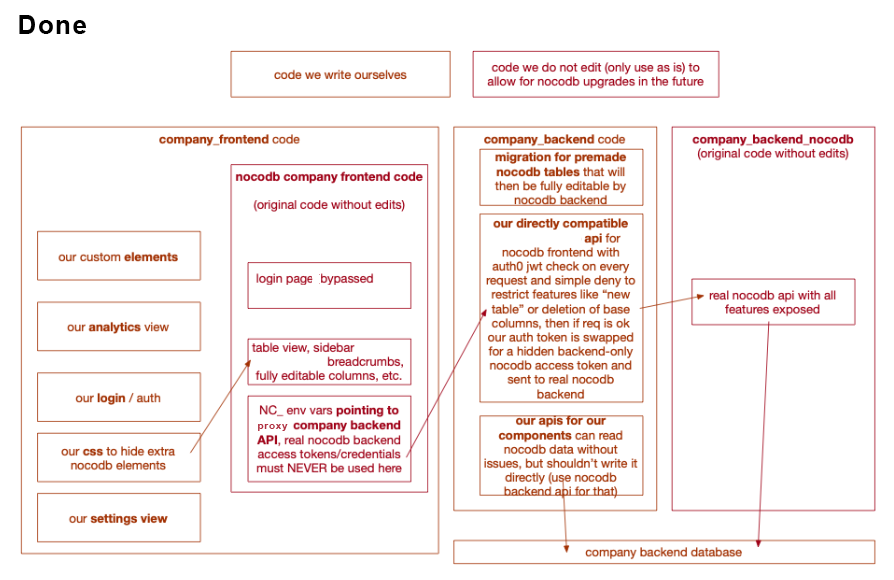
Served over [branchname]-company.launch.rentals/dashboard or localhost:8443/dashboard
Includes NocoDB frontend. NocoDB migrations are currently in company_backend_pginit.
Our own frontend is in company_frontend and Django backend (with proxy API) in company_backend.
NocoDB Features we don't have to program manually:
- Filtering, sorting, custom fields
- Form/table/gallery views (Calendar view is insufficient so it is done using a library)
- Advanced comments system (not ideal API)
- Simple edit history
- Manual refresh
- Partial row updates
- Localization support
- Webhooks (Discord/Slack)
- Object storage support
- Network offline error (and other) banners
- Relational columns
- Import/export functionality
Current NocoDB Integration:
- Use environment variables (.env -> docker-compose.yml -> container) for configuration
- Backend: Proxy API requests through our Company Admin Django code based on nocodb-architecture.webp
- We get to say how NocoDB network requests are authorized (against our Auth0) and whether they're allowed at all
- We can modify any NocoDB data (direct DB access; internal NocoDB API access)
- Shouldn't be a problem, routes are fairly static, just check on NocoDB update if all work (testing = future CI/CD implementation thing)
- Avoids licensing requirements as it does not touch NocoDB codebase
- Frontend: Inject vanilla CSS/JS using Company Admin Frontend static files and Nginx to adjust existing deployment
- Not ideal on NocoDB updates due to non-static routes
- Injection due to NocoDB iframe policy and broken embed feature, otherwise it can be done on our end by iframing NocoDB
- Tries to avoid licensing requirements as our idea is to not touch NocoDB codebase
- Tested and working on PowerPC
- Benefit: Ability to "update" and "iterate" on NocoDB without refactoring their code (we only touch what we write) leads to easier integration of official NocoDB updates (e.g. new features they put out)
- Licensing means we still have to at least declare we are using NocoDB, but in the meantime can focus on other features
Other options:
-
Fork partial NocoDB codebase (we modify frontend only - two separate containers, our package.json is partially prepared for this) vs. Fork entire NocoDB codebase
- We would have to maintain (at least refactor) NocoDB code (partial or full) on each NocoDB update = We have to learn their codebase and iterate on it
- Pros: We get to contribute community updates to NocoDB
- Cons: License says we should make our code changes public
-
Reprogram all NocoDB features ourselves (can use other existing solutions as backbone)
- Not hard if experienced in working with features listed above (programming is easy, knowing ins and outs of how these features break and how to guarantee they will perform well is complex)
- must see beyond the project and have belief it succeeds and becomes influential
- we can buy a pizza and go insane on infected mushroom 5 times to start
- Ideal if we have genuine features that could heavily improve NocoDB and help both employees and customers of rental businesses
- Hard if no experience
Known Issues:
- Column renaming bugs (incl. no error) with concurrent users - hotfix: disable column renaming for Company employees
- Incomplete Slovak translation - hotfix: we can improve it
- SMTP limitations - not a priority, we use external email provider
- Email sending limits with webhosts
- Limited domain reputation with major email providers (Gmail, Outlook)
- Need to prove we're legitimate business due to high email volume
- Requires ongoing support from email providers to avoid spam flagging
- Easier using external provider than building SMTP infrastructure
- Table view refresh not automatic - not a priority, we can manually refresh and only updated field gets overwritten so it's ok
Docker Compose Snippet
  company_admin_backend_nocodb:
    build:
      dockerfile: Dockerfile
      context: company_backend_noco
    environment:
      - NC_DB=pg://company_admin_db:5432...
      - NC_SECRET=...
      # Nocodb env var docs: https://docs.nocodb.com/getting-started/self-hosted/environment-variables
    depends_on:
      company_admin_db:
        condition: service_healthy
    networks:
      - common_network
    restart: unless-stopped